

Techni Measure is proud to offer over 200 standard I-Scan pressure mapping sensors from Tekscan. This can seem overwhelming if you’re unsure which sensor you need; however, the process really boils down to five simple but important application variables.
1) Sensor Size and Shape

It’s important to ensure that your sensor selection will cover the entire area of the load you wish to capture. Keep in mind that multiple sensors can be used to cover large or abnormally shaped areas. Sensors can also be trimmed or specified with holes or gaps in the sensing area to help you maximise your sensing process.
2) Pressure Range
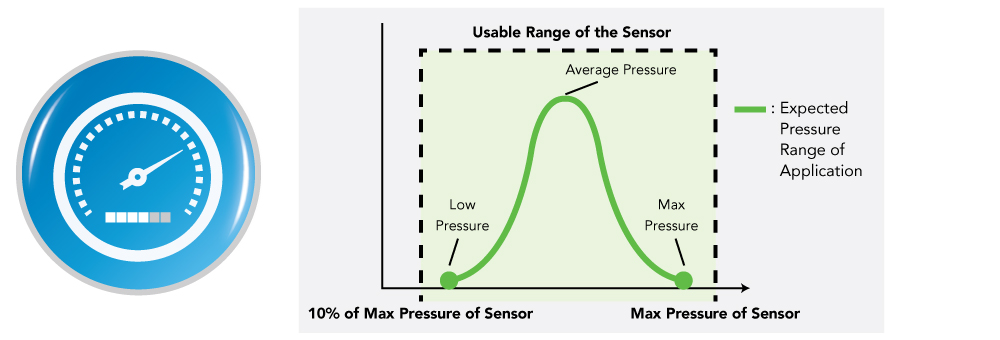
Take it from us- applications can come with some surprises. You may have an expected pressure range for the application in mind, but during the testing phase, you may find peak pressures are significantly higher than anticipated. To account for these peak pressures, your sensor’s measurement range should be between 10% to 100% of the maximum expected range of the application.
3) Sensing Element Density

All pressure mapping sensors are comprised of rows and columns of semiconductive material, with a pressure-sensitive layer applied between. Each intersection of this conductive material is called a Sensel- an individual sensing unit within the matrix. As pressure is applied, the individual sensels experience a change in resistance, which is transmitted through the scanning electronics and read as a digital signal on the I-Scan software.
Tekscan can manufacture sensors with high (up to 248 sensels/cm2) and low density capabilities. As shown above, a higher density will provide more detail to the pressure image. However, sensel density does affect the ability to use different pressure ranges. For instance, lower pressure ranges are best suited for a larger sensel density.
4) Operating Environment
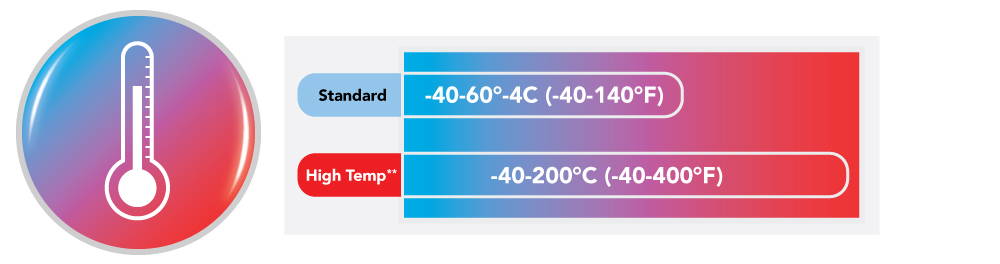
If you anticipate your sensor will be used in a high-temperature operating environment (such as a laminating machine or certain automotive applications), you should consider some of our high-temperature options – indicated by an “HT” on the sensor list. Application speed and wireless capabilities may also play a role in your choice of sensor.
5) Adjustable Sensitivity

The pressure range of every pressure mapping sensor can be adjusted using the Sensitivity Adjustment feature within the I-Scan software. In fact, a single sensor can capture x 3 to 1/7 of the sensor’s listed pressure rating. This allows the user to capture a much wider range of max pressures.
Need more assistance? Contact us today, we’re here to help!
